
 Computer Forum
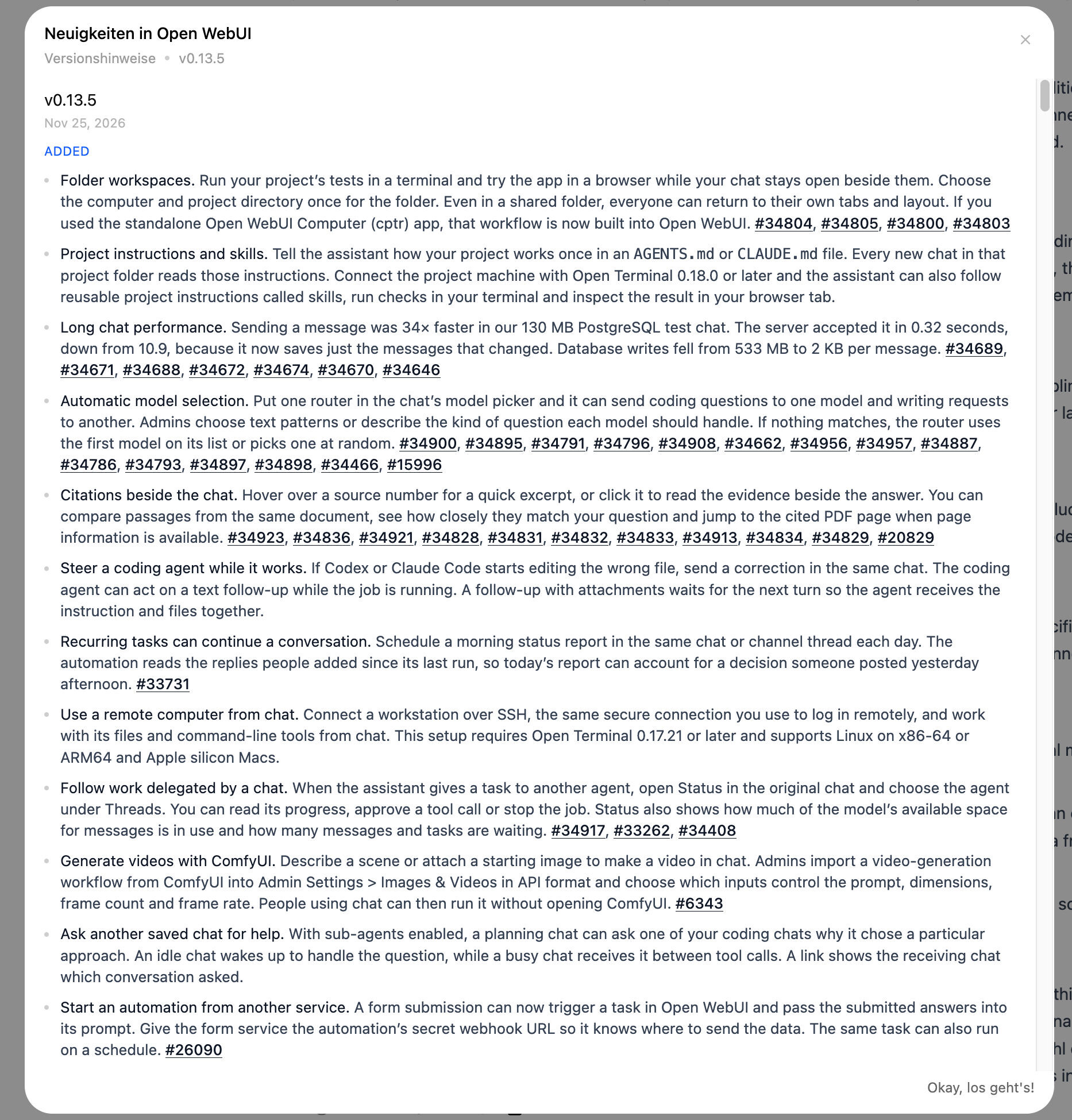 Open WebUI 0 13 5 Update (Image © PCMasters.de)
The update introduces folder workspaces, which allow users to maintain a persistent environment where chat interfaces, project directories, and terminals coexist. This integration replicates the functionality of the standalone Open WebUI Computer (cptr) app and allows users to specify a particular computer and project directory for a folder. This configuration remains consistent for all users within a shared folder, while preserving individual tab layouts.
Project-specific behavior is now controlled by the AGENTS.md or vCLAUDE.md files. If these files are present in a project folder, every new chat automatically adopts the defined instructions. When used with Open Terminal 0.18.0 or higher, the assistant can execute reusable skills, perform terminal checks, and monitor browser results.
In addition, notes can now be saved in these folders. Dragging a note into a folder applies the folder’s read or edit permissions to the note, which simplifies documentation for teams working on the same project.
System Performance and Database Efficiency
A comprehensive overhaul of chat history processing has resulted in a 34-fold increase in message transmission speed during long conversations. In a PostgreSQL test involving a 130-MB chat, the server reception time dropped from 10.9 seconds to 0.32 seconds. This was achieved by switching to a system that stores only modified messages, reducing database write operations from 533 MB to 2 KB per message. The overall responsiveness of the user interface has also been improved. The system now loads models and tools in parallel with the first chat input, and when reopening saved chats, the conversation and the model list are retrieved simultaneously. Tests using a 5 Mbit/s connection showed that messages are displayed about one second faster and input fields become available about one second faster. Searching in shared chats has been optimized for high-traffic environments. By checking access permissions before scanning message content, search time was reduced from 18.2 seconds to 1.4 seconds in a PostgreSQL test involving 61,000 chats.
Improved Routing for AI Models and RAG
Version 0.13.5 implements automatic model selection via a router system. Administrators can define text patterns or descriptions to route specific query types to different models. If no pattern matches, the router selects the first model in its list by default or chooses one at random.
The “Retrieval-Augmented Generation” (RAG) pipeline now features a more detailed citation interface. Users can hover over or click on source numbers for excerpts to display the source citations next to the answer. When the website uses MinerU for PDF extraction, the system preserves the page numbers, allowing users to jump directly to the specific cited PDF page.
Administrators can now use the RAG_FULL_TEXT_THRESHOLDv and RAG_FULL_TEXT_THRESHOLD_TYPE settings to control how models process documents and decide whether the model reads the entire text or retrieves relevant passages based on character or token count.
Agent Coordination and Automation
The update enables task delegation between agents. An assistant can now assign work to a sub-agent and continue interacting with the user while the background task is being executed. Users can track this progress via the Status menu under Threads.
Sub-agents can also interact across different chat sessions. A planning chat can ask a programming chat for technical justifications; the inactive chat is activated to respond, while a busy chat processes the request between tool calls.
The automation features have been expanded to include the following:
- Recurring Conversations: Scheduled tasks, such as daily status reports, can now be continued within the same chat thread, with previous responses being read to maintain context.
- External triggers: Tasks can be triggered by external services via secret webhook URLs, allowing form submissions to initiate prompts.
- Shared automations: Owners can share automated tasks with teammates, allowing them to view the history or change schedules while the task runs under the owner’s permissions.
Security and Administrative Controls
There is a security advisory for this release that strongly recommends updating to version 0.13.5 immediately to address identified security vulnerabilities. Detailed information will be provided in security advisories once CVE identifiers have been assigned.
The administrative audit logs have been expanded to indicate whether requests succeeded or failed. Administrators can filter OpenAI and Ollama requests by URL path and log the activity of anonymous visitors by enabling ENABLE_AUDIT_ANONYMOUS_REQUESTS.
To prevent startup errors in environments that require file-based logging, the ENABLE_AUDIT_LOGS_FILE_STARTUP_CHECK setting ensures that the system can open the log file before processing requests.
User Interface and Accessibility
The user interface has been enhanced with several new features:
- **Mobile Devices: A dedicated row has been added for the “Tab,” “Ctrl,” “Esc,” and arrow keys to improve navigation within the shell on mobile devices.
- Visual Customization: Users can now set custom text and background colors for both light and dark modes.
- Split View: Users can drag notes or other chats to the edge of an active conversation to create a docked, side-by-side view.
- Input Improvements: Chat input now supports queued attachments, allowing users to upload files and compose follow-up questions while the model is still processing a previous round.
- Accessibility: Keyboard navigation for quotes has been improved, as have screen reader announcements when switching between settings.