
 Computer Forum
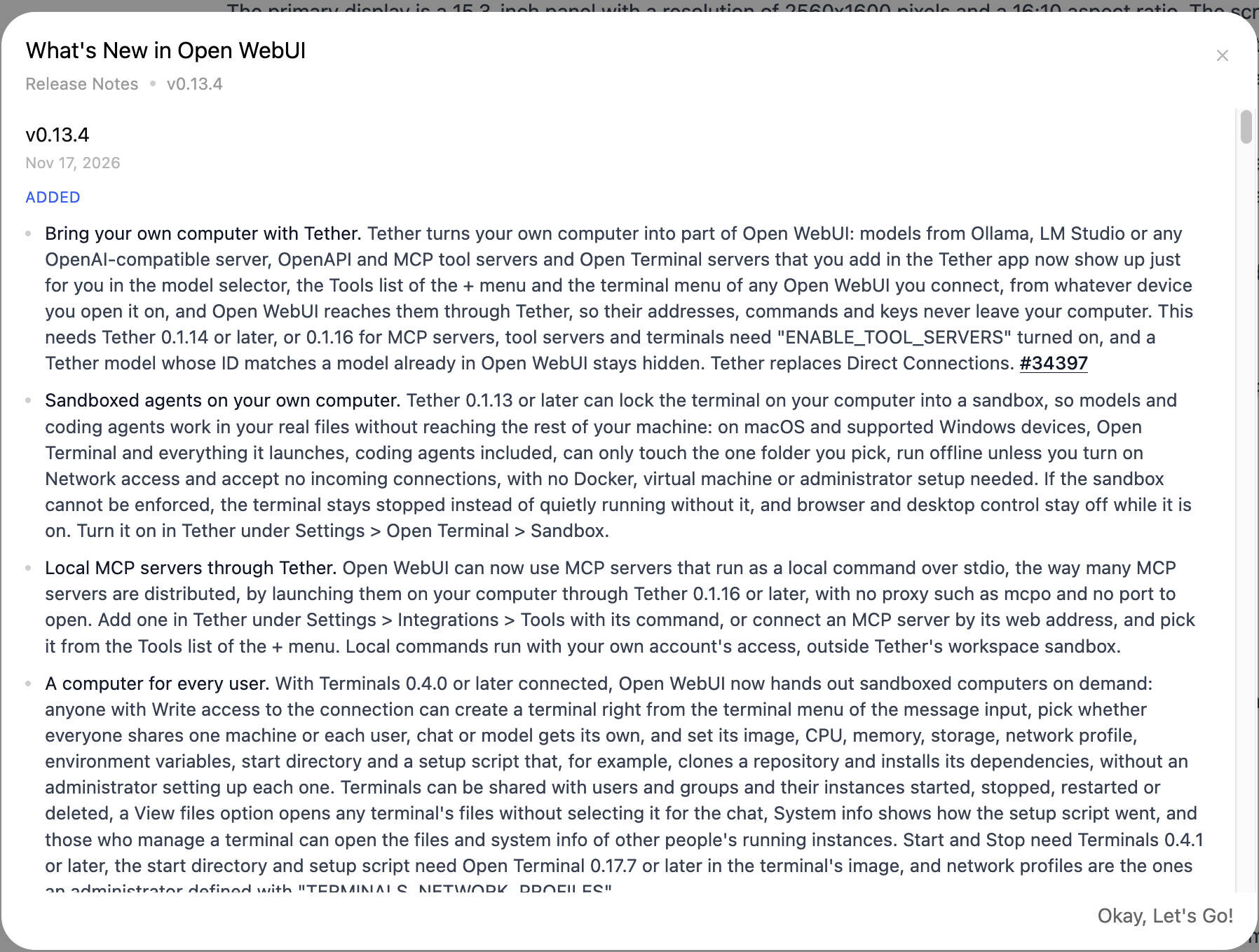 Open WebUI v0 13 4 Update (Image © PCMasters.de)
The most significant new feature in version 0.13.4 is the Tether system, which allows users to integrate their own hardware directly into the Open WebUI ecosystem. Using the Tether app (version 0.1.14 or higher), users can connect to models from Ollama, LM Studio, or OpenAI-compatible servers, as well as OpenAPI, MCP Tool, and Open Terminal servers.
A key security feature of this implementation is that addresses, commands, and API keys remain on the user’s local machine and never leave the computer to reach the Open WebUI instance. For those using MCP servers, Tool servers, or terminals, the ENABLE_TOOL_SERVERS setting must be enabled, and Tether version 0.1.16 is required.
In addition, Open WebUI now supports local MCP servers that are executed via Tether 0.1.16 as local commands through stdio. This eliminates the need for proxies such as mcpo, as well as the need to open specific network ports. These local commands run under the permissions of the user account, separate from the Tether workspace sandbox.
Agent Sandboxing and Coding Agents
To enhance security during autonomous operations, Tether 0.1.13 and later versions can now sandbox terminals. This is particularly relevant for macOS and supported Windows devices, where coding agents and Open Terminal can be restricted to a single designated folder. This isolation ensures that agents cannot access the rest of the computer and operate offline by default, unless network access is explicitly granted. This system works without Docker, virtual machines, or administrator privileges.
Coding agents have also been adapted to function similarly to standard chat models. Agents such as Hermes, Antigravity, GitHub Copilot, Goose, and Qwen Code now join Codex, Claude Code, Cursor, Grok, OpenCode, Cline, Gemini CLI, and Pi. This update enables:
-
Automated Permissions: An
Autosetting for tool permissions allows agents such as Codex, Claude Code, and Grok to approve routine actions on their own. - Effort Level: With advanced parameters, users can now set the effort level for Claude Code, Pi, and ACP agents.
- State Preservation: In forked or cloned agent chats, existing file changes are preserved, though resuming the conversation varies by agent.
In addition, the Git panel has been converted to a GitHub Workbench. With Open Terminal 0.17.8 and the GitHub CLI, users can now manage the entire development cycle—including searching for and editing issues, reviewing pull request labels, and managing merge methods—directly within the user interface.
Multimedia Creation and Data Visualization
Open WebUI v0.13.4 expands its multimedia capabilities with new built-in tools and enhanced provider support:
- Video generation: Administrators can now enable video generation via connections to OpenAI, LiteLLM, or OpenRouter, gaining access to models such as Veo and Kling.
- Support for Multi-Image Models: The system now supports connections to multiple image models (including ComfyUI and AUTOMATIC1111), allowing administrators to define specific models, sizes, and workflows for different users or tasks.
-
Interactive Visualizations: A new built-in tool allows models to create interactive charts, graphs, and calculators directly in the chat. Administrators can customize the behavior of this tool via the
VISUALIZATION_PROMPT_TEMPLATEvariable or the admin interface.
Workspace Management and Folder Coordination
The platform’s organizational structure has been fundamentally redesigned with the introduction of folder chat boards. Folder pages now serve as management hubs and offer the following features:
- Board Views: Chats can be displayed as a board with columns sorted by status, tags, or activity.
- Status Tracking: Folders can implement custom statuses (e.g., Backlog, In Progress, Completed), and the system tracks how long a chat remains in a specific status.
- Integrated Knowledge: Folder pages now include a dedicated knowledge section for managing the specific knowledge bases, notes, and files associated with the chats in that folder.
- Folder Automations: Users can now create and manage automations directly on the folder page and post the results to shared folders.
Optimizations and System Performance
Several backend improvements have been implemented to reduce latency and increase stability:
- Reply Streaming: Streaming of long replies containing numerous code blocks has been optimized; replies that previously took minutes to display now appear within seconds.
- Document Display: PDF previews for large files (up to 1,500 pages) have been optimized to require less storage space by displaying only visible pages.
- Redis Integration: The use of Redis has accelerated the loading of the model list and optimized the processing of profile images.
- Context Compression: The system now performs more stable context compression, ensuring that summaries are preserved even after failed responses or the completion of tool results.
-
Database Efficiency: When
DATABASE_ENABLE_SESSION_SHARINGis enabled, the system preventsQueuePool-Limiterrors during peak loads when loading pages by optimizing how chat lists and inboxes handle database connections.
User Interface Improvements
The user interface has been updated to support more complex multitasking and accessibility:
- Tabbed Navigation: Notes, channels, the workspace, and automations now open as tabs next to the active chat.
- Equal functionality for side chats: Side chats now support the full range of features available in the main view, including token consumption, slash commands, and HTML/SVG previews.
- Terminal persistence: Each chat now saves its associated terminal and working directory, allowing users to restore their environment when reopening the conversation.
-
User Mentions: Models can now use the
Chat Historytool to search for users and mention them in replies, triggering notifications in the mentioned users’ inboxes.
The update can be obtained via Docker or directly from GitHub.